This application replaced an old, hard-to-use host-based system for creating offers for electrical power generators, providing a much simpler interface.
It was developed to support a sales department in selling electrical generators and standby sets.
The user chooses a generator model and selects various components from a list. The selection is driven by customer-defined requirements.
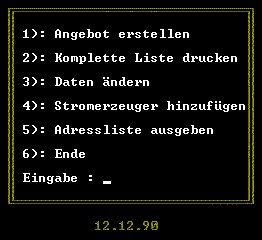
Main Menu
The menu item ‘Create Offer’ leads the user to a screen where the selection of the generator base model and the optional components takes place.
The second item ‘Print Complete List’ dumps the previous selection to an attached printer.
The third item ‘Edit Data’ is used to modify the selection.
‘Add Generator’, the fourth menu item, offers an administrative feature for importing more generators to the internal database.
The fifth item is used to print the customer database to the screen or an attached printer.
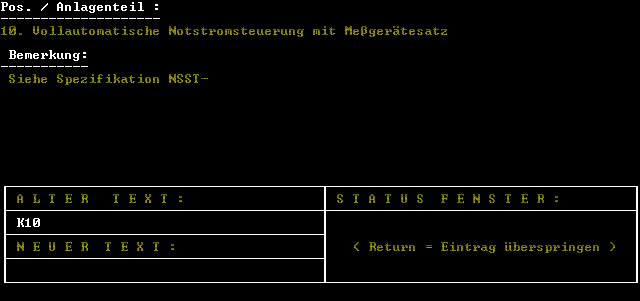
Component List
On this screen components and generator base models are maintained.
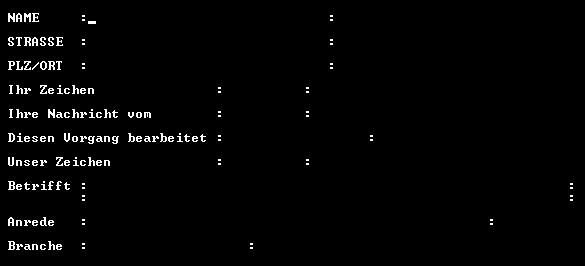
Customer Data
This screen collects customer data to be included in an offer.
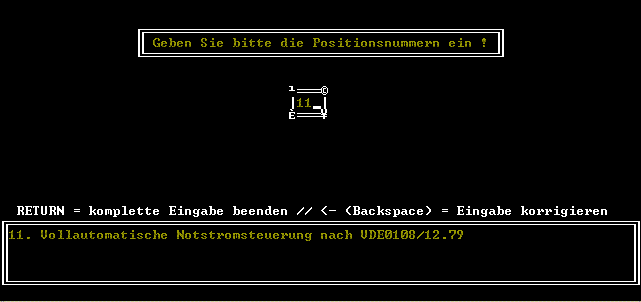
Optional Components
This screenshot shows the selection of optional components for a generator.
| Type | Freelancer Project |
| Environment | MS-DOS, Turbo Pascal 4.0 |
| Link | offer.tar.bz2 (39kB) |